Skip to content

Published Updated
By LogisticsMaterial Team · Updated November 3, 2026
Quick answer: Inventory tags and labels give every item and every shelf a scannable identity, so counts, picks and reorders match your system. Use adhesive barcode labels for shelves, bins and totes, hang tags for counts, and metal inventory tags for assets and harsh sites. Print with thermal transfer when the label must last.
Key takeaways
- Use one unique code per item and never reuse it.
- Match the tag to the place: adhesive labels for bins, hang tags for counts, metal tags for assets.
- Direct thermal labels fade, so choose thermal transfer for anything that stays on a shelf for months.
- An inventory tagging system works only when every move is scanned and audited.
Guide contents
What are inventory tags and labels?
Inventory tags and labels are the identity cards of your stock. Each one links a physical item, box or shelf location to a record in your system, so a scanner or a person can tell what it is and where it belongs. Without them, a warehouse is a very large guessing game.
A tag hangs, ties or fixes to the item. A label sticks to it. In daily talk both words overlap, and people search for inventory tags, inventory labels and inventory stickers to describe the same job. This guide treats them together and shows which one fits which place. If you are still choosing software to read them, start with our guide to an inventory management system.
5 types of inventory tags and labels
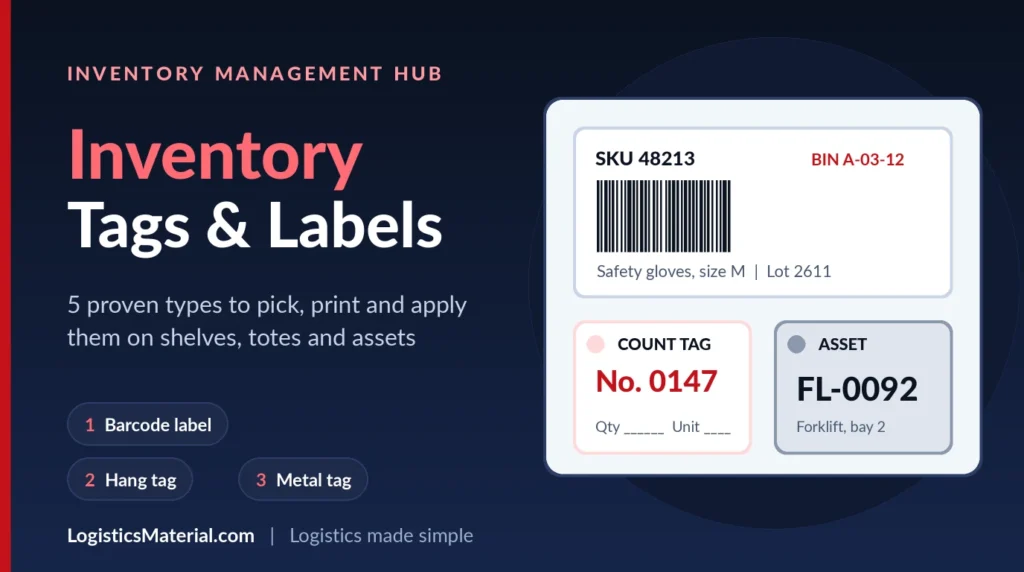
Pick the type by where it lives and how long it must last. The picture below shows the three most common choices.

| Type | Best for | Watch out for |
|---|---|---|
| Adhesive barcode labels | Shelves, bins, totes, cartons | Dirty or curved surfaces weaken the glue |
| Hang tags | Physical counts, loose items, short jobs | Paper tears and fades when wet |
| Metal inventory tags | Tools, equipment, racks, outdoor or hot areas | Higher cost per tag, so use for assets |
| Location labels | Rack beams, aisles, floor zones | Must stay readable at scanning distance |
| RFID tags | Fast reads of many items without line of sight | Cost per tag and tag reading tests |
Most small businesses start with adhesive inventory labels and add the others only where a real problem appears. Fancy tags on cheap stock are like a padlock on a cardboard box.
What to put on inventory labels
A good label answers three questions in one glance: what is it, where is it and which batch. Add the barcode for the scanner and the plain text for the human who has to check it when the scanner jams.

- Barcode. The code your scanner reads.
- Item ID or SKU. The same number as the system, printed in text.
- Short description. Enough for a person to confirm the item.
- Bin location. Zone, aisle, rack and bin, in one fixed pattern.
- Lot or date. Only if you track batches or expiry.
Keep the layout the same on every label. A picker should find the item ID in the same corner every time, even at the end of a long shift.
Which barcode should inventory labels use?
The right code depends on who will scan it. GS1 sets the global standards for products moving between companies. Its EAN and UPC codes are the retail codes used at point of sale, while GS1-128 and ITF-14 are used only in general distribution and logistics. ITF-14 carries only the product number (GTIN) and is often printed straight onto corrugated cartons because it tolerates rougher printing.
| Barcode | Where it is used | Notes |
|---|---|---|
| EAN-13 or UPC-A | Single retail items | Scanned at the checkout, also read in warehouses |
| ITF-14 | Outer cartons | Carries the GTIN only, prints well on corrugated board |
| GS1-128 | Cases and pallets | Can add batch, expiry date or weight to the product number |
| 2D codes (QR, DataMatrix) | Small items, rich data | Hold more data in less space, need an imager scanner |
| Internal code | Your own shelves, bins and assets | Any code your scanner supports, with unique numbers |
For internal inventory barcode labels, many teams use a common linear code and a unique number for each item. Check that your scanner reads it before you print ten thousand labels. For the receiving side of the process, see how barcode scanning fits a perpetual inventory system.
Label material and printing: direct thermal or thermal transfer
Two printing methods dominate inventory labels. Direct thermal uses heat-sensitive paper that darkens under the print head and needs no ribbon. Thermal transfer melts ink from a ribbon onto the label. One label supplier states that direct thermal labels typically last six months to a year, and that heat, sunlight or friction speed up the fading. Thermal transfer prints resist heat, moisture and chemicals.
| Method | Strength | Weakness | Use it for |
|---|---|---|---|
| Direct thermal | No ribbon, lower running cost | Fades with heat, light and friction | Shipping labels and short-term tags |
| Thermal transfer | Long-lasting, resists moisture and chemicals | Ribbon cost and more care | Shelf, rack and bin labels that stay for months |
The rule is simple. If the label stays on a shelf, rack or bin for months, choose thermal transfer. If it rides on a single trip, direct thermal is fine. Low-energy plastics and wet or cold areas usually need a synthetic label material and the right ribbon, so test before you buy a full roll.
Always test the full flow with real stock: print, apply, handle, move and scan at the dock. Check that the glue holds on your actual surfaces and temperatures, and that the code still scans after a week of abuse.
Once your labels scan cleanly, the next step is software that records every scan. See our guide to cloud based inventory management software.
Importing your stock? Know the landed cost first
Duty and fees decide what each unit really costs. Estimate them before the goods arrive, with our free calculator.
Try the calculatorHow to build an inventory tagging system in 6 steps
An inventory tagging system is the set of rules behind the labels: how you name items and locations, who prints, where tags go and when they are scanned. Labels without rules turn into a colourful mess. Follow these six steps.
- Map your locations. Name zone, aisle, rack and bin in one pattern, such as A-03-12, and label every location.
- Give every item a unique ID. One SKU, one number, never reused, even after the product is discontinued.
- Choose the label type per area. Adhesive labels for bins and totes, metal tags for assets, hang tags for counts.
- Print at receiving. Label goods when they arrive, before they reach a shelf, so nothing sits unidentified.
- Scan every move. Receive, put away, pick and count by scan so the record follows the stock.
- Audit and fix. Run regular counts, investigate mismatches and replace damaged labels the same day.
Step six is where most systems quietly fail. Scanning without counting is like weighing yourself with the scale turned to the wall. For a clean count routine, follow our guide to physical inventory and stock control.
Custom inventory tags: when they are worth it
Custom inventory tags carry your own text, numbering, logo or barcode. They pay off when the standard stock does not fit, for example when you need pre-numbered tags for an annual count, serial numbers for equipment, tamper-evident labels or a colour code per department.
- Pre-numbered count tags. Each number is issued and tracked, so no tag goes missing.
- Colour coding. One colour per zone, owner or status makes a quick visual check possible.
- Serial or asset numbers. Printed or engraved IDs link a tool to its service history.
- Company branding. Useful for returnable assets such as pallets and crates.
Order a small sample first. Check the print quality, the attachment method and the scan result before you place a large order of custom inventory labels or tags.
Metal inventory tags for assets and harsh sites
Metal inventory tags suit places where paper and plastic fail: heat, outdoor weather, chemicals and rough handling. Typical uses are tools, forklifts, racking, pressure vessels and tool cribs. They are stamped, engraved or marked with a permanent ID and fixed with a rivet, screw or wire.
They cost more per tag, so reserve them for assets that live for years. For consumable stock that turns over weekly, an adhesive label is cheaper and faster to replace. Matching the tag to the item life is the quiet saver in any inventory tagging system.
Using hang tags in a physical count
Hang tags still earn their place at count time. In a classic physical count, each tag is pre-numbered, attached to the stock and filled in with the item, quantity and unit. A control sheet records every tag number, so a missing or duplicated tag shows up before the totals are used.
- Issue the tags. Record the number range on a control sheet.
- Count and tag. One team counts and tags, a second team verifies a sample.
- Collect every tag. Reconcile the numbers issued against the numbers returned.
- Enter the counts. Compare them with the system and investigate the gaps.
The result feeds your closing figure. Learn the formula in our guide on how to calculate ending inventory, and remember that goods on the road may belong to you even if they are not on your shelves, as explained in goods in transit.
A quick sizing example
This is an illustrative example, not a quote. A small distributor has 1,200 bin locations and 4,000 SKUs. It plans one location label per bin and two item labels per SKU, one for the shelf and one for the carton. That is 1,200 plus 8,000, or 9,200 labels. Add a 10% allowance for reprints and damage, and the first-year order is 10,120 labels.
The same arithmetic tells you how many rolls to stock and how many labels each printer must produce per shift. Plan the numbers before you pick the label size.
5 mistakes that break an inventory tagging system
- Reusing codes. A recycled number links new stock to old history and ruins reports.
- Wrong material. Direct thermal paper in a hot, sunny dock fades before the next count.
- Labels that are too small. A tiny or low-contrast code fails at scanning distance.
- No human-readable text. When the scanner jams, nobody can read the item.
- No label update on moves. A new bin needs a new location label the same day.
Shipping stock across borders?
Compare freight forwarders on price, coverage and service with our free evaluation checklist.
Get the checklistWhat to read next on inventory
Labels are one part of a working stock process. Continue with the inventory management hub, then read how FIFO and LIFO value the stock you label, how to calculate average inventory, and how a 3PL provider labels and stores goods for you.
Trusted sources on barcodes and label printing
- GS1 Canada: barcode standards for EAN/UPC, GS1-128, ITF-14 and 2D codes
- GS1 UK: which barcode to use for cases or traded units
- LabelValue: direct thermal vs thermal transfer printing
- Racklify: thermal transfer or direct thermal labels for a warehouse
This guide is general education. Test every label, ribbon and scanner combination in your own site before you buy in volume.
Frequently asked questions
What are inventory tags?
Inventory tags are tags or labels fixed to stock, shelves or assets to identify them. Each one carries an ID, often with a barcode, that links the item to a record in the inventory system.
What is the difference between inventory labels and tags?
A label sticks to a surface, a tag hangs or fixes to the item with a string, wire, rivet or screw. Both identify stock, and many businesses use inventory labels on shelves and tags for counts and assets.
What should be on an inventory label?
Put the item ID or SKU, a barcode, a short description and the bin location on every label. Add the lot number or date only if you track batches or expiry.
Which barcode is best for inventory labels?
For your own shelves and bins, a common linear code with a unique number works well if your scanner reads it. For cartons and pallets moving between companies, GS1 codes such as ITF-14 and GS1-128 are the logistics standards.
Should I use direct thermal or thermal transfer for inventory labels?
Use thermal transfer for labels that stay on shelves, racks or bins for months, because the print resists heat, moisture and chemicals. Use direct thermal for short-term labels, since it fades over time.
When do I need metal inventory tags?
Choose metal inventory tags for assets that face heat, weather, chemicals or rough handling, such as tools, equipment and racking. They last longer but cost more per tag than adhesive labels.
Are custom inventory tags worth it?
Custom inventory tags are worth it when you need pre-numbered count tags, serial numbers, colour coding or tamper-evident features. Order a sample first to check print quality and scanning.
What is an inventory tagging system?
An inventory tagging system is the set of rules for naming items and locations, printing and applying labels, scanning each move and auditing the results. The tags are only the visible part of it.